External API Specification Documentation · 09 November 2026
API domains and credentials are provided during onboarding. Examples are illustrative; use your own credentials and refer to your approved integration specification.
Document History
Version
Date
Author
Remarks
1.0
09 Nov. 2026
Muhammad Shiddiq Fizuhri
Initial Document
1 · Document Overview
Process diagram · source page 8 · Click diagram to view full size.
1 Document Overview
This article is primarily intended for SBI technical implementation personnel of payment system partners but can also be used as a reference for management and business personnel. Before starting to integrate SBI products and solutions, be sure to carefully read the latest SBI documentation, including API references and code examples. By reading the documentation, you can better understand the relevant information about SBI products and solutions, thereby improving integration efficiency and reducing errors.
1.1 Production Credentials
After your merchant account is approved, SBI will automatically send production credential information to your system administrator email. Please log in to your system administrator email to retrieve it. If you have not received the email, please contact the SBI’ Customer Service to request it. To ensure fund security, do not disclose the email contents to others to avoid potential losses.
1.2 Communication Protocol
Table 1-1: Communication Protocol
Property
Specification
Transmission Method
To ensure transaction security, data transmission employs the HTTPS protocol, requiring TLS version 1.2 or higher.
Submission Method
Submissions use the POST method.
Data Format
Both submitted and returned data adhere to the application/json format.
Character Encoding
UTF-8 character encoding is uniformly adopted.
Signature Algorithm
Signatures are first generated using SHA256WithRSA, then encrypted with base64.
Validation Logic
When processing transaction data, first validate the business response, then verify the transaction status.
1.3 Process Diagram
2 · Rule Definitions
2 Rule Definitions
2.1 Amount Unit
The unit of measurement is Indonesian Rupiah (IDR), and it must be rounded to two decimal places, e.g., 10.25. The payment amount cannot be less than the merchant's gateway fee.
2.2 Transaction Amount Limit
Table 2-1: Transaction amount limit
Code
Minimum IDR / Single Transaction
Maximum Credit Limit / Single Transaction
Wallet
10,000.00
The maximum limit is determined by each wallet
Bank
10,000.00
50,000,000.00
2.3 Payment Type
Table 2-2: Payment type
Payment Type
Payment Type Code
wallet
wallet
bank
bank
2.4 Signature Rules
Table 2-3: Signature rule
type
parameter
Encryption method
SHA256WithRSA
Key format
PKCS8
Signature Algorithm
First, use SHA256WithRSA to sign, and then perform base64 encryption.
Public/private key length
2048
2.4.1 Generate Public/Private Key Pairs
a. Merchants need to generate a private key and a public key pair and exchange the public key with SBI. Merchants should keep their private key safe to prevent leakage. b. SBI does not accept merchant private keys. Please do not send merchant private keys to SBI. c. When sending asynchronous notifications, use the SBI public key for signature verification.
We recommend using OpenSSL. See the documentation at: https://www.openssl.org/source/ Merchants generate public and private keys using the following command:
Example
#Generate the private & public key files. And then remove the newline and the -----BEGIN **** KEY-----
and the -----END **** KEY-----
#Private Key
openssl genrsa 2048 | openssl pkcs8 -topk8 -nocrypt -out private.key.pem
#Public Key
openssl rsa -in private.key.pem -pubout > public.key.pem

       After executing the above command, two files, private.key.pem and
       public.key.pem, will be generated. private.key.pem contains the private key,
       which is used to sign messages when requesting a transaction and is kept by the
       merchant.
       The contents of private.key.pem are as follows (example):
[Example key value omitted; use your own generated key or the SBI public key supplied during onboarding.]

       The content of public.key.pem is as follows (example):
[Example key value omitted; use your own generated key or the SBI public key supplied during onboarding.]
The public key provided by the platform, platform-public.key.pem, contains the
      following content (for reference only, not for production environments):
[Example key value omitted; use your own generated key or the SBI public key supplied during onboarding.]
2.4.2 Example of a digital signature rule (SHA256WithRSA)
a. SBI’ merchants generate their own 2048-bit RSA keys and exchange public keys. i. The merchant's public key needs to be sent by the merchant to the operations team (operations@sbitransfer.id) via email. ii. After the operations team activates the merchant, the merchant will receive the public key in the activation email. b. Minify Request Body. i. Remove special characters such as `\n`, `\r`, `\t`, and ` ` (space) from parameter values within body, as well as JSON formatting characters and non-data characters. ii. Parameters with `null` values are excluded from signing. c. Signature string concatenation: i. stringContent: Concatenation method HTTPMethod:EndpointUrl:Lowercase(SHA256Hex(minify(body) )):TimeStamp ii. HTTPMethod: HTTP request methods, for example POST, GET iii. EndpointUrl: The path of the request URL, for example /api- pay/snap/v1.2/transfer/status iv. TimeStamp: Request time, format 2025-03-06T08:12:45.534+07:00, X-TIMESTAMP in the request header. d. Signature calculation: i. X-SIGNATURE: Base64(SHA256withRSA(stringContent,privateKey))
Example: Assume the transmitted parameters are as follows
Domain: Please contact SBI’ operations team for details.
Table 3-1: Interface address
API
Method
Endpoint
Service code
Description
Account Availability Inquiry
POST
/api-pay/snap/v1.2/account-inquiry-external
16
Validate beneficiary account and obtain referenceNo.
Initiate Payment
POST
/api-pay/snap/v1.2/transfer-interbank
18
Create payment.
Payment Order Query
POST
/api-pay/snap/v1.2/transfer/status
36
Check payment order status.
Account Balance Inquiry
POST
/api-pay/snap/v1.2/balance-inquiry
11
Check remaining balance.
Reconciliation Document Download
GET
/api-pay/snap/v1.2/transfer-file
10
Download reconciliation file.
a. The payment processing API domain name and testing parameters will be provided by the operations staff after the cooperation is established. b. After a successful order placement via the sandbox environment, a callback will be automatically initiated within three minutes. c. Merchants in the sandbox environment only need to test whether the order placement, query, and callback interfaces are working properly.
3.2 Parameter Guide
Table 3-2: Parameter guide
Required
Explanation
M
Mandatory
O
Optional
C
In certain conditions it becomes mandatory (Condition)
4.1 · Account Availability Inquiry
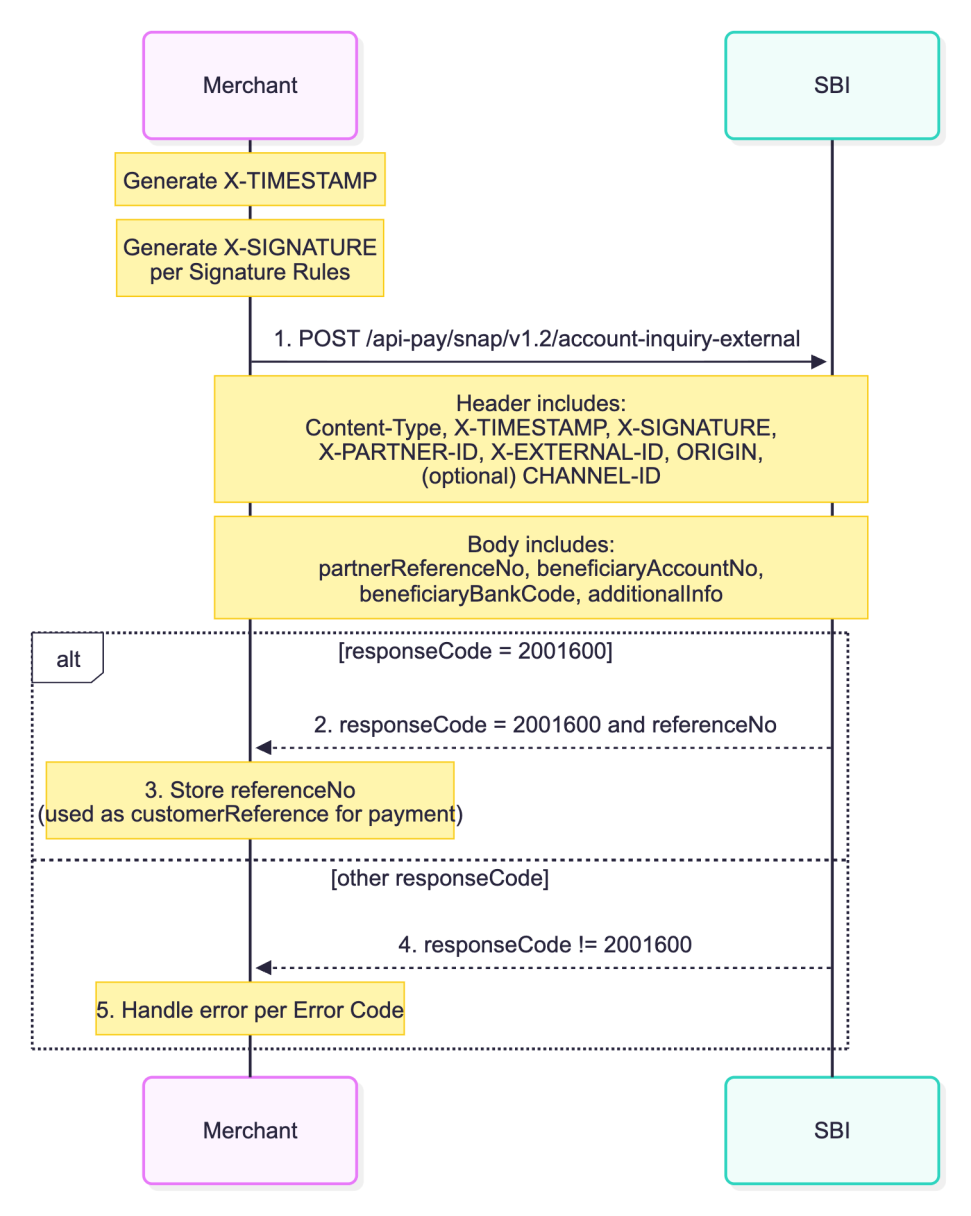
Process diagram · source page 14 · Click diagram to view full size.
4 Create Payout
4.1 Account Availability Inquiry
The purpose of inquiry beneficiary account is to check its validity. Before you execute the payment order, you must run Account Availability Inquiry to check its validity beforehand. Use “referenceNo” value from the inquiry endpoint.
4.1.1 Request Parameters
API address: View API References
4.1.1.1 Header
Table 4-1: Inquiry request header
Field Name
Type
Field Value
Required
Content-Type
String(30)
Fixed value: application/json;charset=utf-8
M
X-TIMESTAMP
String(29)
Current time, format 2022-09-16T16:58:47.964+07:00
M
X-SIGNATURE
String(64)
Signature characters, see Signature Rules for details.
M
X-PARTNER-ID
String(20)
Merchant ID
M
X-EXTERNALID
String(64)
Reference numbers should be unique for the same day, e.g., 2023041800590004810
M
ORIGIN
String(64)
The customer requests an Origin Domain, for example: www.yourdomain.com
M
CHANNEL-ID
String(64)
Customer requests device identification ID
O
4.1.1.2 Body
Table 4-2: Inquiry request body
Field Name
Variable
Type
Required
Description
Merchant order number
partnerReferenceNo
String(64)
M
Order numbers within the merchant system must be up to 32 characters long and may contain letters, ensuring their uniqueness within the merchant system.
Recipient Account
beneficiaryAccountNo
String(20)
M
The receiver institutional account number
Receiving bank code
beneficiaryBankCode
String(30)
M
The receiver institution code, refer to Appendix B (Bank Code or Wallet)
Additional Information
additionalInfo
Object
O
Additional information for the transaction request
4.1.1.2.1 additionalInfo
Table 4-3: Inquiry request body additional info field
Field Name
Variable
Type
Required
Description
Payment on behalf type
remitType
String(10)
C
For payment account type codes, please refer to the Payment Type list.
Amount
amount
Object
M
The order amount is calculated based on the set currency and is rounded to two decimal places.
City Code
beneficiaryCity
String(10)
O
The city code of the beneficiary.
ID number
beneficiaryIdCard
String(20)
O
Beneficiary's identification number.
Account Name
beneficiaryAccountName
String(50)
O
Beneficiary account name.
4.1.1.2.2 amount
Table 4-4: Inquiry request body amount field
Field Name
Variable
Type
Required
Description
Amount
value
decimal(12,2)
M
The unit is Indonesian Rupiah, and two decimal places are supported.
Currency
currency
String(3)
M
Please check the Country Code list.
4.1.2 Response Parameters
4.1.2.1 Header
Table 4-5: Inquiry response header
Field Name
Type
Field Value
Required
Content-Type
String(30)
Fixed value: application/json;charset=utf-8
M
X-TIMESTAMP
String(29)
Current time, format 2022-09-16T16:58:47.964+07:00
M
X-SIGNATURE
String(64)
Signature characters, see Signature Rules for details.
O
4.1.2.2 Body
Table 4-6: Inquiry response body
Field Name
Variable
Type
Required
Description
Return status code
responseCode
String(7)
M
2001600: Success; other values indicate failure, please refer to the Error Code list.
Response Description
responseMessage
String(150)
O
Corresponding response code information description
The following fields will only return a response when the responseCode is 2001600.
Table 4-7: Inquiry response body success field
Field Name
Variable
Type
Required
Description
Merchant order number
partnerReferenceNo
String(64)
M
Order numbers within the merchant system must be up to 32 characters long and may contain letters, ensuring their uniqueness within the merchant system.
currency
currency
String(4)
M
For detailed currency codes, please see the Country Code list.
Payment voucher
referenceNo
String(64)
M
Code credential, a unique credential used to initiate the payment on behalf interface.
Receiving bank code
beneficiaryBankCode
String(8)
M
The receiver institution code, refer to Appendix B (Bank Code or Wallet)
Name of receiving bank
beneficiaryBankName
String(50)
M
The name of the receiver's institution can be found in the Appendix B (Bank Code or Wallet).
Recipient Account
beneficiaryAccountNo
String(34)
M
The receiver's institutional account number.
Payee's name
beneficiaryAccountName
String(100)
M
The receiver’s name
Additional Information
additionalInfo
Object
O
Additional information for the transaction request
4.1.2.2.1 additionalInfo
Table 4-8: Inquiry response body additional info field
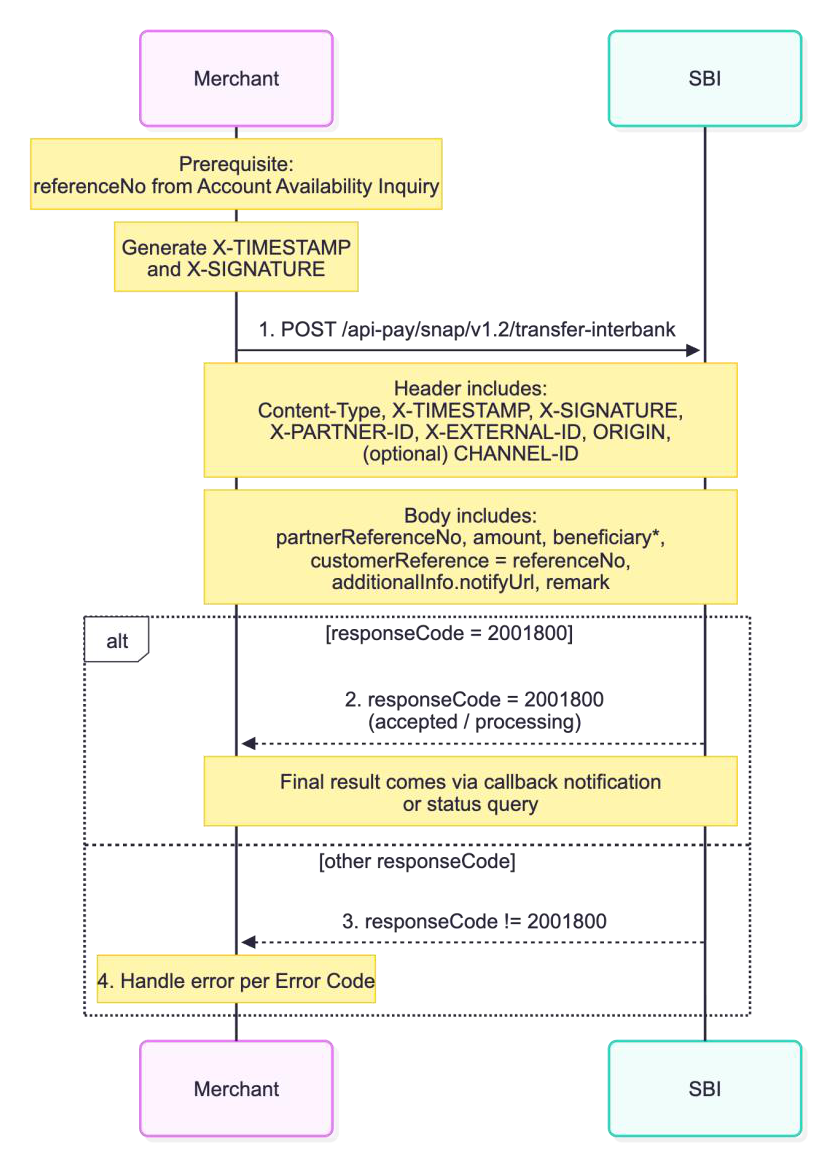
Process diagram · source page 20 · Click diagram to view full size.
4.2 Initiate Payment
The success response returned by the Initiate Payment API does not indicate that the transaction has been fully completed. Instead, it confirms only that the payment request has been received and is being processed. The definitive result of whether the transaction is successful or not will be communicated through the asynchronous callback notification or can be verified by querying the payment order status. Merchants should therefore rely on these mechanisms to confirm the final outcome of a transaction.
4.2.1 Request Parameters
Endpoint URL: Check API References
4.2.1.1 Header
Table 4-9: Payment request header
field name
type
Field value
Required
Content-Type
String(30)
Fixed value: application/json;charset=utf-8
M
X-TIMESTAMP
String(29)
Current time, format 2022-09- 16T16:58:47.964+07:00
M
X-SIGNATURE
String(64)
Signature characters, see Signature Rules for details.
M
X-PARTNER-ID
String(20)
Merchant ID
M
X-EXTERNALID
String(64)
Reference numbers should be unique for the same day, e.g., 2023041800590004810
M
ORIGIN
String(64)
The customer requests an Origin Domain, for example: www.yourdomain.com
M
CHANNEL-ID
String(64)
Customer requests device identification ID
O
4.2.1.2 Body
Table 4-10: Payment request body
Field Name
Variable
Type
Required
Description
Merchant order number
partnerReferenceNo
String(64)
M
Order numbers within the merchant system must be up to 32 characters long and may contain letters, ensuring their uniqueness within the merchant system.
Rate type
feeType
String(25)
O
Fixed value: OUR
Currency
currency
String(3)
O
Please check the Country Code list.
Amount
amount
Object
M
The order amount is calculated based on the set currency and is rounded to two decimal places.
The receiver institution code, refer to Appendix B (Bank Code or Wallet)
Recipient's email address
beneficiaryEmail
String(20)
O
The receiver’s email address
Trading hours
transactionDate
String(25)
M
yyyy-MM-dd HH:mm:ss e.g.:2023-04-18 12:08:56
Source trading account
sourceAccountNo
String(19)
O
Source Merchant Number
describe Merchant's own transfer →
remark
String(100)
O
Name of the person or business sending the funds. How to fill: Merchant legal name Transfer for a submerchant → Submerchant legal name Transfer for a walk-in customer → Customer's name Enter the actual sender's name, not automatically the API account holder's name.
Additional Information
additionalInfo
Object
O
Additional information for the transaction request
4.2.1.2.1 additionalInfo
Table 4-11: Payment request body additional info field
Field Name
Variable
Type
Required
Description
Payment on behalf type
remitType
String(10)
C
For payment account type codes, please refer to the Payment Type list.
Callback URL
notifyUrl
String(100)
O
Notification URL for payment results.
City Code
beneficiaryCity
String(10)
O
The city code of the beneficiary.
ID number
beneficiaryIdCard
String(20)
O
Beneficiary's identification number.
Account Name
beneficiaryFirstname
String(50)
O
Beneficiary account name.
Account opening surname
beneficiaryLastname
String(50)
O
Beneficiary's account name.
phone number
beneficiaryPhoneNumber
String(50)
O
Beneficiary's mobile phone number.
4.2.1.2.2 amount
Table 4-12: Payment request body amount field
Field Name
Variable
Type
Required
Description
Amount
value
decimal(12,2)
M
The unit is Indonesian Rupiah, and two decimal places are supported.
Currency
currency
String(3)
M
Please check the Country Code list.
4.2.2 Response Parameters
4.2.2.1 Header
Table 4-13: Payment response header
Field Name
Type
Field value
Required
Content-Type
String(30)
Fixed value: application/json;charset=utf-8
M
X-TIMESTAMP
String(29)
Current time, format 2022-09-16T16:58:47.964+07:00
M
X-SIGNATURE
String(64)
Signature characters, see Signature Rules for details.
O
4.2.2.2 Body
Table 4-14: Payment response body
Field Name
Variable
Type
Required
Description
Return status code
responseCode
String(7)
M
2001800: Success; other values indicate failure, please refer to the Error Code list.
Response Description
responseMessage
String(150)
O
Corresponding response code information description
The following fields will only return a response when the responseCode is 2001800.
Table 4-15: Payment response body success fields
Field Name
Variable
Type
Required
Description
Merchant order number
partnerReferenceNo
String(64)
M
Order numbers within the merchant system must be up to 32 characters long and may contain letters, ensuring their uniqueness within the merchant system.
Platform order number
referenceNo
String(64)
O
Platform order number
Amount
amount
Object
M
The order amount is calculated based on the set currency and is rounded to two decimal places.
Recipient Account
beneficiaryAccountNo
String(30)
M
The receiver's institutional account number
Receiving bank code
beneficiaryBankCode
String(8)
M
The receiver institution code, refer to Appendix B (Bank Code or Wallet)
Source trading account
sourceAccountNo
String(19)
O
Source Merchant Number
Additional Information
additionalInfo
Object
O
Additional information for the transaction request
4.2.2.2.1 amount
Table 4-16: Payment response body amount field
Field Name
Variable
Type
Required
Description
Amount
value
decimal(12,2)
M
The unit is Indonesian Rupiah, and two decimal places are supported.
Currency
currency
String(3)
M
Please check the Country Code list.
4.2.2.2.2 additionalInfo
Table 4-17: Payment response body additional info field
Field Name
Variable
Type
Required
Description
Transaction fees
transFeeRate
decimal(12,2)
O
Transaction fees
Single transaction fee
transFeeAmount
decimal(12,2)
O
Single transaction fee
Total transaction fee rate
totalTransFee
decimal(12,2)
O
Total transaction fee rate
Caution A success response from the Initiate Payment API does not confirm that the transaction has been completed. It only indicates that the request has been received and is being processed. The final transaction status must be verified either through the asynchronous callback notification or by querying the payment order status.
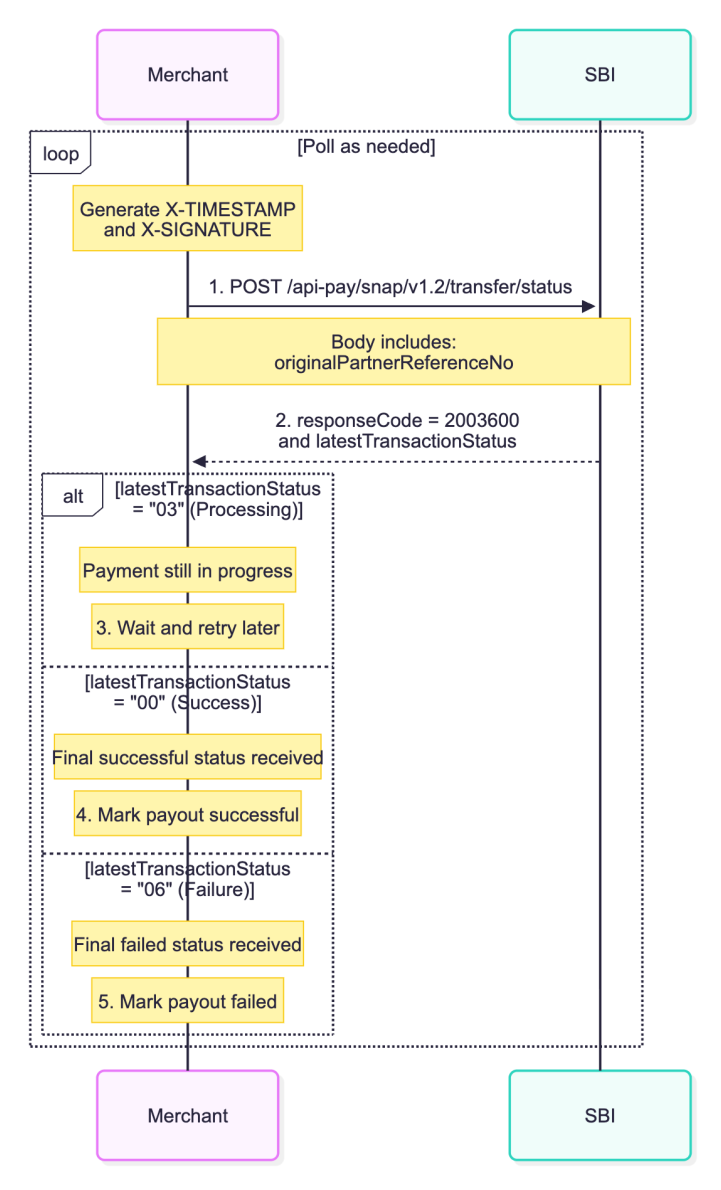
Process diagram · source page 27 · Click diagram to view full size.
4.3 Payment Order Query
The Payment Order Query API is designed to provide the definitive status of a transaction after it has been initiated. Unlike the initial payment response, which only confirms that the request is being processed, the query response reflects the actual outcome of the transaction. Merchants should use this interface to verify whether a payment has succeeded, failed, or is still pending. This ensures that reconciliation and customer communication are based on accurate, final transaction data.
4.3.1 Request Parameters
Endpoint URL: Check API References
4.3.1.1 Header
Table 4-18: Status query request header
Field Name
Type
Field value
Required
Content-Type
String(30)
Fixed value: application/json;charset=utf-8
M
X-TIMESTAMP
String(29)
Current time, format 2022-09-16T16:58:47.964+07:00
M
X-SIGNATURE
String(64)
Signature characters, see Signature Rules for details.
M
X-PARTNER-ID
String(20)
Merchant ID
M
X-EXTERNALID
String(64)
Reference numbers should be unique for the same day, e.g., 2023041800590004810
M
ORIGIN
String(64)
The customer requests an Origin Domain, for example: www.yourdomain.com
M
CHANNEL-ID
String(64)
Customer requests device identification ID
O
4.3.1.2 Body
Table 4-19: Status query request body
Field Name
Variable
Type
Required
Description
Merchant order number
originalPartnerReferenceNo
String(64)
M
Order numbers within the merchant system must be up to 32 characters long and may contain letters, ensuring their uniqueness within the merchant system.
Platform order number
originalReferenceNo
String(64)
O
Platform order number
Reference number
originalExternalId
String(32)
O
X-EXTERNAL-ID information in the transaction header
Service Code
serviceCode
String(20)
O
Always enter 18 Transaction Type Indicator (Service Code of the Original Transaction Request)
Trading hours
transactionDate
String(25)
O
yyyy-MM-dd HH:mm:ss e.g.: 2023-04-18 12:08:56
Amount
amount
Object
O
The order amount is calculated based on the set currency and is rounded to two decimal places.
Additional Information
additionalInfo
Object
O
Additional information for the transaction request
4.3.1.2.1 amount
Table 4-20: Status query request body amount field
Field Name
Variable
Type
Required
Description
Amount
value
decimal(12,2)
M
The unit is Indonesian Rupiah, and two decimal places are supported.
Currency
currency
String(3)
M
Please check the Country Code list.
4.3.2 Response Parameters
4.3.2.1 Header
Table 4-21: Status query response header
Field Name
Type
Field value
Required
Content-Type
String(30)
Fixed value: application/json;charset=utf-8
M
X-TIMESTAMP
String(29)
Current time, format 2022-09-16T16:58:47.964+07:00
M
X-SIGNATURE
String(64)
Signature characters, see Signature Rules for details.
O
4.3.2.2 Body
Table 4-22: Status query response body
Field Name
Variable
Type
Required
Description
Return status code
responseCode
String(7)
M
2003600: Success; other values indicate failure, please refer to the Error Code list.
Response Description
responseMessage
String(150)
O
Corresponding response code information description
The following fields will only return a response when the responseCode is 2003600.
Table 4-23: Status query response body success fields
Field Name
Variable
Type
Required
Description
Merchant order number
originalPartnerReferenceNo
String(64)
M
Order numbers within the merchant system must be up to 32 characters long and may contain letters, ensuring their uniqueness within the merchant system.
Platform order number
originalReferenceNo
String(64)
O
Platform order number
Service Code
serviceCode
String(20)
O
Always enter 18 Transaction Type Indicator (Service Code of the Original Transaction Request)
Transaction status
latestTransactionStatus
String(7)
M
03: Processing (waiting for bank to update final result); 00: Success; 06: Failure
Status Description
transactionStatusDesc
String(64)
M
Transaction status description
Amount
amount
Object
M
The order amount is calculated based on the set currency and is rounded to two decimal places.
Original reference number
originalExternalId
String(32)
O
X-EXTERNAL-ID information in the original transaction header
Reference number
referenceNumber
String(32)
O
Reference number
Merchant ID
sourceAccountNo
String(19)
O
Source Merchant Number
Recipient Account
beneficiaryAccountNo
String(30)
O
The receiver's institutional account number
Additional Information
additionalInfo
Object
O
Additional information for the transaction request
4.3.2.2.1 amount
Table 4-24: Status query response body amount field
Field Name
Variable
Type
Required
Description
Amount
value
decimal(12,2)
M
The unit is Indonesian Rupiah, and two decimal places are supported.
Currency
currency
String(3)
M
Please check the Country Code list.
4.3.2.2.2 additionalInfo
Table 4-25: Status query response body additional info field
Field Name
Variable
Type
Required
Description
Transaction fees
transFeeRate
decimal(12,2)
O
Transaction fees
Single transaction fee
transFeeAmount
decimal(12,2)
O
Single transaction fee
Total transaction fee rate
totalTransFee
decimal(12,2)
O
Total transaction fee rate
Caution The Payment Order Query API provides the final status of a transaction. Do not rely on the initial payment response as proof of success as it’s only confirms that the request is being processed. Merchants must use this query (or wait for the callback) to determine whether the transaction has truly succeeded, failed, or remains pending.
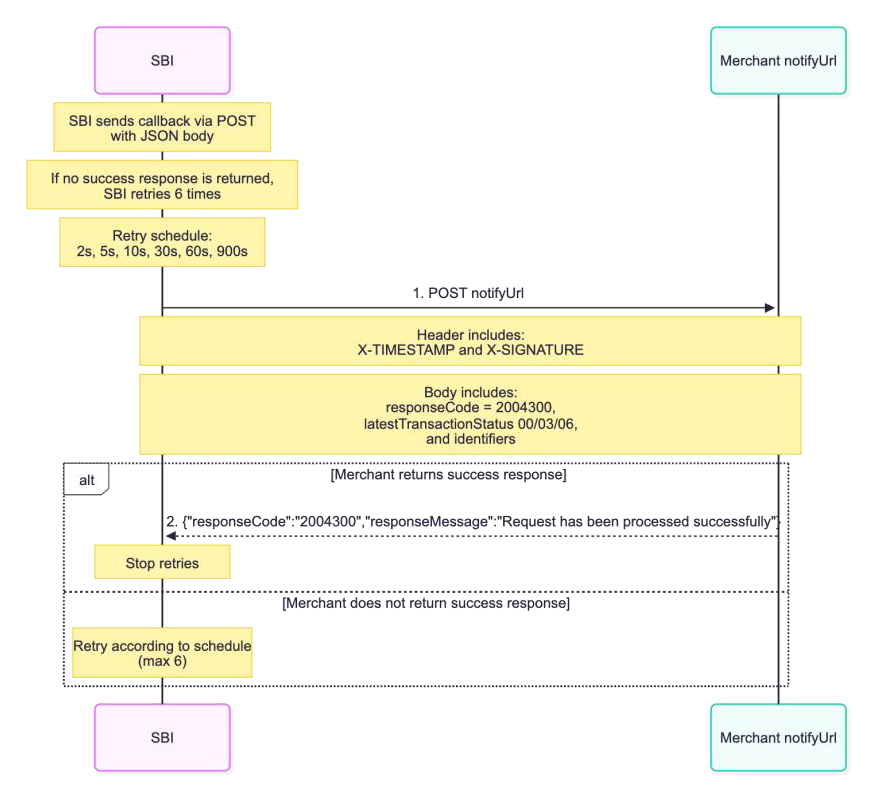
Process diagram · source page 33 · Click diagram to view full size.
4.4 Payment Asynchronous Callback Notification
The Payment Asynchronous Callback Notification is the primary mechanism by which SBI communicates the final outcome of a transaction. Once a payment request has been processed, the system automatically sends a callback to the merchant’s designated URL with the definitive transaction status. This ensures merchants receive real-time confirmation without needing to continuously poll the order query interface. SBI will initiate a request using the POST method with JSON parameters. Please return the message after receiving our notification.
Example
{"responseCode":"2004300","responseMessage":"Request has been processed successfully"}
Otherwise, we will notify you periodically (a total of 6 times). The notification intervals are
2 seconds, 5 seconds, 10 seconds, 30 seconds, 60 seconds, and 900 seconds,
respectively.
4.4.1 Notification
4.4.1.1 Header
Table 4-26: Callback request header
Field Name
Type
Field value
Required
Content-Type
String(30)
Fixed value: application/json;charset=utf-8
M
X-TIMESTAMP
String(29)
Current time, format 2022-09-16T16:58:47.964+07:00
M
X-SIGNATURE
String(64)
Signature characters, see Signature Rules for details.
M
X-PARTNER-ID
String(20)
Merchant ID
M
X-EXTERNALID
String(64)
Reference numbers should be unique for the same day, e.g., 2023041800590004810
M
ORIGIN
String(64)
The customer requests an Origin Domain, for example: www.yourdomain.com
M
CHANNEL-ID
String(64)
Customer requests device identification ID
O
4.4.1.2 Body
Table 4-27: Callback request body
Field Name
Variable
Type
Required
Description
Return status code
responseCode
String(7)
M
2004300: Success; other values indicate failure, please refer to the Error Code list.
Response Description
responseMessage
String(150)
O
Corresponding response code information description
The following fields will only return a response when the responseCode is 2004300.
Table 4-28: Callback request body success fields
Field Name
Variable
Type
Required
Description
Merchant order number
originalPartnerReferenceNo
String(64)
M
Order numbers within the merchant system must be up to 32 characters long and may contain letters, ensuring their uniqueness within the merchant system.
Platform order number
originalReferenceNo
String(64)
O
Platform order number
Service Code
serviceCode
String(20)
O
Always enter 18 Transaction Type Indicator (Service Code of the Original Transaction Request)
Transaction status
latestTransactionStatus
String(7)
M
03: Processing (waiting for bank to update final result); 00: Success; 06: Failure
Status Description
transactionStatusDesc
String(64)
M
Transaction status description
Amount
amount
Object
M
The order amount is calculated based on the set currency and is rounded to two decimal places.
Original reference number
originalExternalId
String(32)
O
X-EXTERNAL-ID information in the original transaction header
Reference number
referenceNumber
String(32)
O
Reference number
Merchant ID
sourceAccountNo
String(19)
O
Source Merchant Number
Recipient Account
beneficiaryAccountNo
String(30)
O
The receiver’s institutional account number
Additional Information
additionalInfo
Object
O
Additional information for the transaction request
4.4.1.2.1 amount
Table 4-29: Callback request body amount field
Field Name
Variable
Type
Required
Description
Amount
value
decimal(12,2)
M
The unit is Indonesian Rupiah, and two decimal places are supported.
Currency
currency
String(3)
M
Please check the Country Code list.
4.4.1.2.2 additionalInfo
Table 4-30: Callback request body additional info field
Process diagram · source page 37 · Click diagram to view full size.
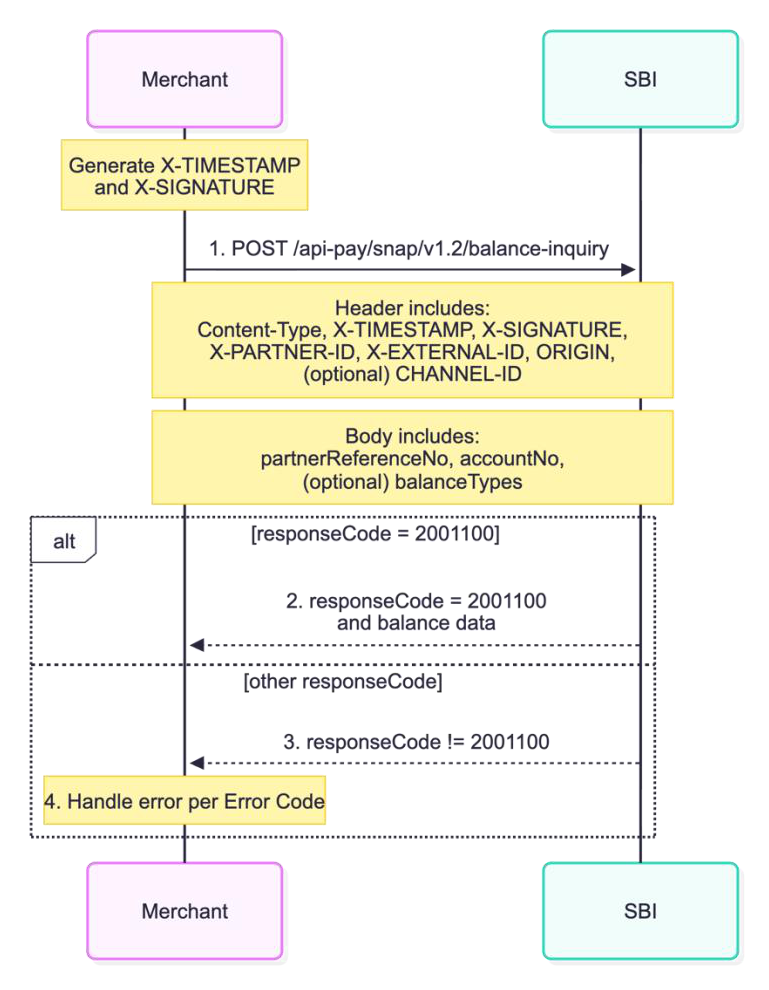
4.5 Account Balance Inquiry
4.5.1 Request Parameters
Endpoint URL: Check API References
4.5.1.1 Header
Table 4-31: Balance inquiry request header
Field Name
Type
Field value
Required
Content-Type
String(30)
Fixed value: application/json;charset=utf-8
M
X-TIMESTAMP
String(29)
Current time, format 2022-09-16T16:58:47.964+07:00
M
X-SIGNATURE
String(64)
Signature characters, see Signature Rules for details.
M
X-PARTNER-ID
String(20)
Merchant ID
M
X-EXTERNALID
String(64)
Reference numbers should be unique for the same day, e.g., 2023041800590004810
M
ORIGIN
String(64)
The customer requests an Origin Domain, for example: www.yourdomain.com
M
CHANNEL-ID
String(64)
Customer requests device identification ID
O
4.5.1.2 Body
Table 4-32: Balance inquiry request body
Field Name
Variable
Type
Required
Description
Request number
partnerReferenceNo
String(64)
M
Order numbers within the merchant system must be up to 32 characters long and may contain letters, ensuring their uniqueness within the merchant system.
Merchant ID
accountNo
String(64)
M
Merchant ID
Query type
balanceTypes
String(10)
O
Fixed value: Cash
Additional Information
additionalInfo
Object
O
Additional information for the transaction request
4.5.2 Response Parameters
4.5.2.1 Header
Table 4-33: Balance inquiry response header
Field Name
Type
Field Value
Required
Content-Type
String(30)
Fixed value: application/json;charset=utf-8
M
X-TIMESTAMP
String(29)
Current time, format 2022-09-16T16:58:47.964+07:00
M
X-SIGNATURE
String(64)
Signature characters, see Signature Rules for details.
O
4.5.2.2 Body
Table 4-34: Balance inquiry response body
Field Name
Variable
Type
Required
Description
Return status code
responseCode
String(7)
M
2001100: Success; other values indicate failure, please refer to the Error Code list.
Response Description
responseMessage
String(150)
O
Corresponding response code information description
The following fields will only return a response when the responseCode is 2001100.
Table 4-35: Balance inquiry response body success fields
Field Name
Variable
Type
Required
Description
Request number
partnerReferenceNo
String(64)
M
Order numbers within the merchant system must be up to 32 characters long and may contain letters, ensuring their uniqueness within the merchant system.
Platform transaction number
referenceNo
String(64)
O
Platform transaction number
Merchant ID
accountNo
String(20)
O
Merchant ID
Merchant Name
name
String(140)
O
Merchant Name
Account Information
accountInfos
Array
M
Transaction status description
4.5.2.2.1 accountInfos
Table 4-36: Balance inquiry response body account info field
Field Name
Variable
Type
Required
Illustrate
Account Type
balanceType
String(4)
O
Fixed value: Cash
Registration status
registrationStatusCode
String(4)
O
registered: already registered
Account Status
status
String(4)
O
Available: Available; Freeze: Freeze
Account balance
amount
Object
O
The order amount is calculated based on the set currency and is rounded to two decimal places.
Floating amount
floatAmount
Object
O
The order amount is calculated based on the set currency and is rounded to two decimal places.
Payment in transit
holdAmount
Object
O
The order amount is calculated based on the set currency and is rounded to two decimal places.
Account available balance
availableBalance
Object
O
The order amount is calculated based on the set currency and is rounded to two decimal places.
Account balance
ledgerBalance
Object
O
The order amount is calculated based on the set currency and is rounded to two decimal places.
Payment limit
currentMultilateralLimit
Object
O
The order amount is calculated based on the set currency and is rounded to two decimal places.
Additional Information
additionalInfo
Object
O
Additional information for the transaction request
4.5.2.2.2 amount
Table 4-37: Balance inquiry response body amount field
Field Name
Variable
Type
Required
Description
Amount
value
decimal(12,2)
M
The unit is Indonesian Rupiah, and two decimal places are supported.
Currency
currency
String(3)
M
Please check the Country Code list.
4.5.2.2.3 floatAmount
Table 4-38: Balance inquiry response body float amount field
Field Name
Variable
Type
Required
Description
Amount
value
decimal(12,2)
M
The unit is Indonesian Rupiah, and two decimal places are supported.
Currency
currency
String(3)
M
Please check the Country Code list.
4.5.2.2.4 holdAmount
Table 4-39: Balance inquiry response body hold amount field
Field Name
Variable
Type
Required
Description
Amount
value
decimal(12,2)
M
The unit is Indonesian Rupiah, and two decimal places are supported.
Currency
currency
String(3)
M
Please check the Country Code list.
4.5.2.2.5 availableBalance
Table 4-40: Balance inquiry response body available balance field
Field Name
Variable
Type
Required
Description
Amount
value
decimal(12,2)
M
The unit is Indonesian Rupiah, and two decimal places are supported.
Currency
currency
String(3)
M
Please check the Country Code list.
4.5.2.2.6 ledgerBalance
Table 4-41: Balance inquiry response body ledger balance field
Field Name
Variable
Type
Required
Description
Amount
value
decimal(12,2)
M
The unit is Indonesian Rupiah, and two decimal places are supported.
Currency
currency
String(3)
M
Please check the Country Code list.
4.5.2.2.7 currentMultilateralLimit
Table 4-42: Balance inquiry response body current multilateral limit field
Field Name
Variable
Type
Required
Description
Amount
value
decimal(12,2)
M
The unit is Indonesian Rupiah, and two decimal places are supported.
Process diagram · source page 44 · Click diagram to view full size.
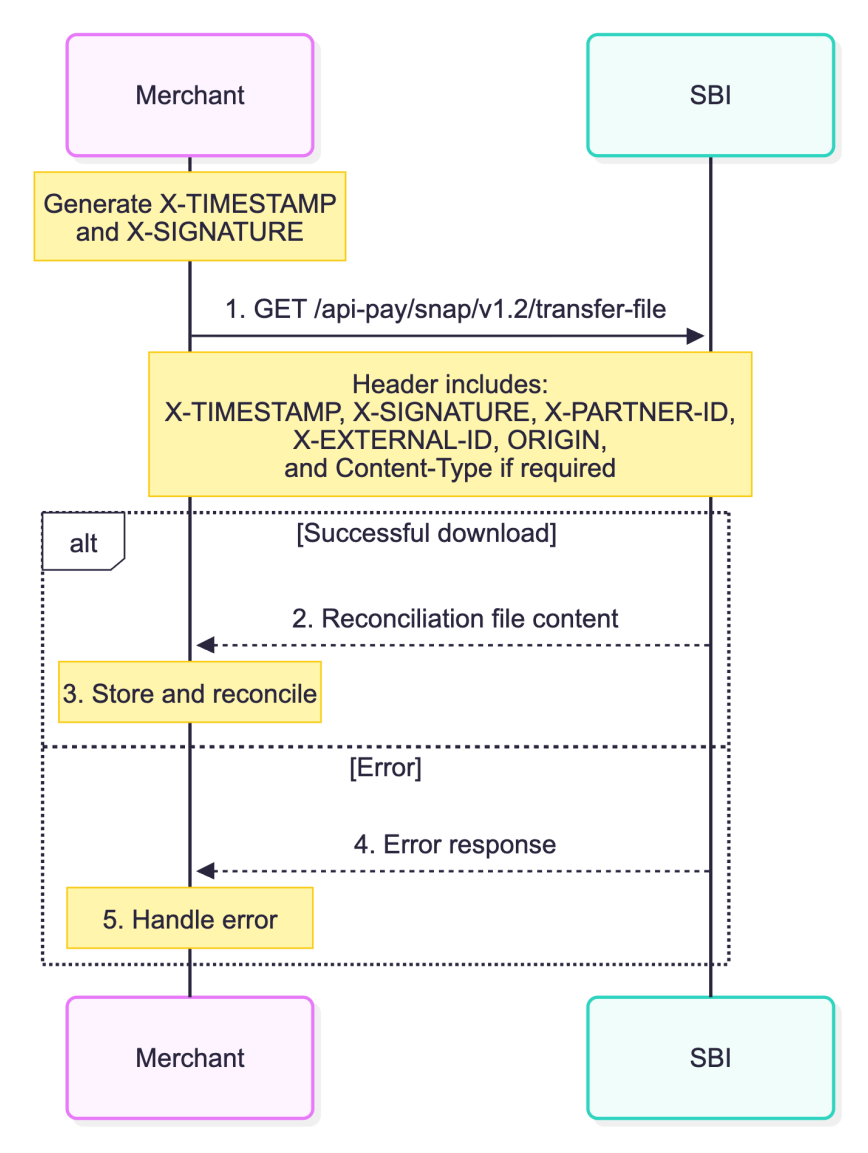
4.6 Reconciliation Document Download
4.6.1 Request Parameters
Endpoint URL: Check API References
4.6.1.1 Header
Table 4-43: Recon file request header
Field Name
Type
Field value
Required
Content-Type
String(30)
Fixed value: application/json;charset=utf-8
M
X-TIMESTAMP
String(29)
Current time, format 2022-09-16T16:58:47.964+07:00
M
X-SIGNATURE
String(64)
Signature characters, see Signature Rules for details.
M
X-PARTNER-ID
String(20)
Merchant ID
M
X-EXTERNALID
String(64)
Reference numbers should be unique for the same day, e.g., 2023041800590004810
M
ORIGIN
String(64)
The customer requests an Origin Domain, for example: www.yourdomain.com
M
CHANNEL-ID
String(64)
Customer requests device identification ID
O
4.6.1.2 Body
Table 4-44: Recon file request body
Field Name
Variable
Type
Required
Description
Request number
partnerReferenceNo
String(64)
M
Order numbers within the merchant system must be up to 32 characters long and may contain letters, ensuring their uniqueness within the merchant system.
Successful transaction date
date
String(64)
M
The successful date should be in the format of 2023-04-21 and should be earlier than the current date.
Additional Information
additionalInfo
Object
O
Additional information for the transaction request
4.6.2 Response Parameters
To be able to successfully download the reconciliation file, we advise you to first make sure that there’s at least a single SUCCESSFUL transaction on the desired date first. If there are no successful transaction on that particular date, the system will return an invalid field format (time format in the download file function is incorrect) error message.
4.6.2.1 Body
The system would return CSV file. The filename would be remitFile_order_xxx.csv where the xxx format is like following 20230421.
The parameters in the file remitFile_order_xxx.csv are comma-separated (",") and are as follows: MerchantNo,MerchantOrderNo,PlatformOrderNo,FlowNo,BankName,BeneficiaryAccountName,Benefi ciaryAccountNumber,Amount,TransFeeRate,TransFeeAmount,TotalTransFee,VatFee,RequestTime,PayTi me
Appendix A · Error and Country Codes
Error Code
Please check the serviceCode parameter in the interface address. responseCode = HTTP statusCode + serviceCode + caseCode
HTTP Code
Case Code
responseMessage
200
00
Successful
400
00
Bad Request
400
01
Invalid Field Format {...}
400
02
Missing Mandatory Field {...}
401
00
Unauthorized Client
403
00
Transaction Expired
403
01
Feature Not Allowed
403
02
Exceeds Transaction Amount Limit
403
04
Activity Count Limit Exceeded
403
05
Repeating Merchant Transaction Number
403
14
Insufficient Funds
403
15
Transaction Not Permitted.
403
18
Inactive Card/Account/Customer
403
23
Account Limit Exceed
404
01
Transaction not found
404
08
Invalid Merchant
404
11
Invalid Card/Account/Customer/ Virtual Account
404
12
Invalid Bill/Virtual Account
404
13
Amount is incorrect
404
15
Incorrect Google verification code
409
00
Conflict
409
01
Duplicate Customer Reference Number
500
01
Internal Server Error
500
02
External Server Error
500
00
Request Timeout
Country Code
Nation
Country Code
Currency
Language
Indonesia
INDONESIA
IDR
EN, ID
Appendix B · Bank and Wallet Codes
Bank Code
Bank code
Bank name
SWIFT code
001
BANK INDONESIA
INDOIDJA
002
BANK BRI
BRINIDJA
003
BANK EKSPOR INDONESIA
BEXIIDJA
008
BANK MANDIRI
BMRIIDJA
009
BANK BNI
BNINIDJA
011
BANK DANAMON
BDINIDJA
013
PERMATA BANK
BBBAIDJA
014
BANK BCA
CENAIDJA
016
PT. BANK MAYBANK INDONESIA Tbk.
IBBKIDJA
019
BANK PANIN
PINBIDJA
020
BANK ARTA NIAGA KENCANA
ARNKIDJ1
022
BANK CIMB NIAGA
BNIAIDJA
023
BANK UOB INDONESIA
BBIJIDJA
026
BANK LIPPO
LIPBIDJA
028
BANK NISP
NISPIDJA
031
CITIBANK
CITIIDJX
032
KC JPMORGAN CHASE BANK, N.A
CHASIDJX
033
BANK OF AMERICA
BOFAID2X
034
ING INDONESIA BANK
INGBNL2A
036
PT. BANK CHINA CONSTRUCTION BANK INDONESIA, TBK
MCORIDJA
037
BANK ARTHA GRAHA
ARTGIDJA
039
BANK CREDIT AGRICOLE INDOSUEZ
AGRICHGG
040
BANGKOK BANK PUBLIC CO.LTD
BKKBIDJA
042
THE BANK OF TOKYO MITSUBISHI UFJ LTD
BOTKIDJX
045
BANK SUMITOMO MITSUI INDONESIA
SUNIIDJA
046
BANK DBS INDONESIA
DBSBIDJA
047
BANK RESONA PERDANIA
BPIAIDJA
048
BANK MIZUHO INDONESIA
MHCCIDJA
050
STANDARD CHARTERED BANK
SCBLIDJX
052
BANK ABN AMRO
ABNAIDJA
053
BANK KEPPEL TATLEE BUANA
ABNANL2A
054
BANK CAPITAL INDONESIA,TBK.
BCIAIDJA
057
BANK BNP PARIBAS INDONESIA
BNPAIDJA
059
KOREA EXCHANGE BANK DANAMON
KOEXIDJA
060
RABOBANK INTERNASIONAL INDONESIA
UOBBIDJA
061
ANZ PANIN BANK
ANZBIDJX
067
DEUTSCHE BANK AG.
DEUTIDJA
068
BANK WOORI INDONESIA
HVBKIDJA
069
BANK OF CHINA LIMITED
BKCHIDJA
076
BANK BUMI ARTA
BBAIIDJA
087
PT. BANK HSBC INDONESIA
HSBCIDJA
088
BANK ANTARDAERAH
ANTDIDJD
089
BANK HAGA
RABOIDJA
093
BANK IFI
BILRCVC1
095
BANK CENTURY,TBK.
CICTIDJA
097
BANK MAYAPADA
MAYAIDJA
110
BANK JABAR
PDJBIDJA
111
BANK DKI
BDKIIDJ1
112
BPD DIY
PDYKIDJ1
113
BANK JATENG
PDJGIDJ1
114
BANK JATIM
PDJTIDJ1
115
PT.BANK PEMBANGUNAN DAERAH JAMBI
PDJMIDJ1
116
PT. BANK ACEH SYARIAH
SYACIDJ1
117
BANK SUMUT
PDSUIDJ1
118
BANK NAGARI
PDSBIDJ1
119
BANK RIAU KEPRI
PDRIIDJA
120
BANK SUMSEL
BSSPIDSP
121
BANK LAMPUNG
PDLPIDJ1
122
BPD KALSEL
PDKSIDJ1
123
BPD KALIMANTAN BARAT
PDKBIDJ1
124
BPD KALTIM
PDKTIDJ1
125
BPD KALTENG
PDKGIDJ1
126
PT. BANK SULSELBAR
PDWSIDJ1
127
BANK SULUT
PDWUIDJ1
128
PT. BANK PEMBANGUNAN DAERAH NTB
PDNBIDJ1
129
PT. BANK PEMBANGUNAN DAERAH BALI
ABALIDBS
130
PT.BANK PEMBANGUNAN DAERAH NTT
PDNTIDJ1
131
PT.BANK PEMBANGUNAN DAERAH MALUKU
PDMLIDJ1
132
PT.BANK PEMBANGUNAN DAERAH PAPUA
PDIJIDJ1
133
PT. BPD BENGKULU
PDBKIDJ1
134
PT. BPD SULAWESI TENGAH
PDWGIDJ1
135
PT. BPD SULAWESI TENGGARA
PDWRIDJ1
137
PT. BANK PEMBANGUNAN DAERAH BANTEN
PDBBIDJ1
145
PT. BANK NUSANTARA PAHRAYANGAN
NUPAIDJ1
146
PT. BANK OF INDIA INDONESIA, TBK
SWBAIDJ1
147
BANK MUAMALAT
MUABIDJA
151
BANK MESTIKA DHARMA
MEDHIDS1
152
PT. BANK SHINHAN INDONESIA
MEEKIDJ1
153
BANK SINARMAS (BANK SHINTA INDONESIA)
SBJKIDJA
157
BANK MASPION INDONESIA
MASDIDJ1
159
BANK HAGAKITA
BHAGIDS1
161
BANK GANESHA
GNESIDJA
162
BANK WINDU KENTJANA
WIKEIDJ1
164
HALIM INDONESIA BANK
ICBKIDJA
167
BANK KESAWAN
AWANIDJA
200
BANK TABUNGAN NEGARA (PERSERO)
BTANIDJA
212
BANK HIMPUNAN SAUDARA 1906,TBK.
BSDRIDJA
213
BANK TABUNGAN PENSIUNAN NASIONAL
TAPEIDJ1
253
PT BANK NANO SYARIAH
NANOIDJ1
405
BANK SWAGUNA
SWAGIDJ1
422
BANK BRI SYARIAH
DJARIDJ1
425
PT. BANK JABAR BANTEN SYARIAH
SYJBIDJ1
426
BANK MEGA
MEGAIDJA
427
PT BANK BNI SYARIAH
SYNIIDJ1
441
BANK BUKOPIN
BBUKIDJA
451
PT BANK SYARIAH INDONESIA TBK
BSMDIDJA
459
BANK BISNIS INTERNASIONAL
BUSTIDJ1
466
BANK SRI PARTHA
SIPAIDB10B5
472
BANK JASA JAKARTA
JSABIDJ1
484
BANK BINTANG MANUNGGAL
HNBNIDJA
485
BANK BUMIPUTERA
BUMIIDJA
490
BANK NEO COMMERCE (BANK YUDHA BHAKTI)
YUDBIDJ1
491
BANK MITRANIAGA
MGABIDJ1
494
BANK AGRO NIAGA
AGTBIDJA
498
PT. BANK SBI INDONESIA
IDMOIDJ1
501
PT BANK DIGITAL BCA
BBLUIDJA
503
BANK NASIONALNOBU - ALFINDO
LFIBIDJ1
506
BANK SYARIAH MEGA
BUTGIDJ1
513
BANK INA PERDANA
IAPTIDJA
517
PT. BANK PANIN DUBAI SYARIAH
ARFAIDJ1
520
PT. PRIMA MASTER BANK
PMASIDJ1
521
BANK PERSYARIKATAN INDONESIA
SDOBIDJ1
523
BANK DIPO INTERNATIONAL
BDIPIDJ1
525
BANK AKITA
AKITJPJT
526
PT. BANK OKE INDONESIA
LMANIDJ1
531
PT. BANK AMAR INDONESIA
LOMAIDJ1
535
PT. BANK SEABANK INDONESIA
SSPIIDJA
536
BANK UIB
SYCAIDJ1
542
PT. BANK JAGO Tbk
ATOSIDJ1
547
BANK PURBA DANARTA
PUBAIDJ1
548
BANK MULTI ARTA SENTOSA
BMSEIDJA
553
BANK MAYORA
MAYOIDJA
555
BANK INDEX SELINDO
BIDXIDJA
559
CENTRATAMA NASIONAL BANK
CNBAIDJ1
562
BANK FAMA INTERNASIONAL
FAMAIDJ1
564
BANK SINAR HARAPAN BALI
SIHBIDJ1
566
BANK VICTORIA INTERNATIONAL
VICTIDJ1
567
ALLO BANK (BANK HARDA)
HRDAIDJ1
600
BANK BPR SUPRA ARTAPERSADA
600
688
BANK BPR KARYAJATNIKA SEDAYA
688
722
PT. BANK DANAMON INDONESIA UNIT USAHA SYARIAH
SYBDIDJ1
724
PT. BANK DKI UNIT USAHA SYARIAH
SYDKIDJ1
725
PT. BANK PEMBANGUNAN DAERAH JATENG UNIT USAHA SYARIAH
SYJGIDJ1
734
PT. BANK SINARMAS UNIT USAHA SYARIAH
SYTBIDJ1
777
FINNET-SERVICE
FIEVRUM1
789
DOMPETKU (INDOSAT)
789
867
BANK BPR EKA BUMI ARTHA
867
911
TELKOMSEL (TCASH)
911
945
PT. BANK IBK INDONESIA
IBKOIDJA
946
BANK MERINCORP
MEREIDJ1
947
BANK ALADIN SYARIAH (BANK MAYBANK INDOCORP)
NETBIDJA
948
BANK OCBC - INDONESIA
OCBCIDJA
949
BANK CHINA TRUST INDONESIA
CTCBIDJA
950
BANK COMMONWEALTH
BICNIDJA
987
ARTASAJA PEMBAYARAN ELEKTRONIS.
987
013S
PT. BANK PERMATA,TBK UNIT USAHA SYARIAH
SYBBIDJ1
016S
PT. BANK MAYBANK INDONESIA Tbk. UNIT USAHA SYARIAH
SYBKIDJ1
022S
PT. BANK CIMB NIAGA TBK - UNIT USAHA SYARIAH
SYNAIDJ1
028S
PT.BANK OCBC NISP TBK - UNIT USAHA SYARIAH
SYONIDJ1
112S
PT.BANK PEMBANGUNAN DAERAH DIY UNIT USAHA SYARIAH
SYYKIDJ1
114S
PT.BANK PEMBANGUNAN DAERAH JATIM - UNIT USAHA SYARIAH
SYJTIDJ1
115S
PT. BANK PEMBANGUNAN DAERAH JAMBI UUS
SYJMIDJ1
117S
PT. BANK PEMBANGUNAN DAERAH SUMUT UUS
SYSUIDJ1
118S
PT. BANK NAGARI - UNIT USAHA SYARIAH
SYSBIDJ1
120S
PT. BPD SUMSEL DAN BABEL UNIT USAHA SYARIAH
SYSSIDJ1
122S
PT. BANK PEMBANGUNAN DAERAH KALSEL - UNIT USAHA SYARIAH
SYKSIDJ1
123S
PT.BANK PEMBANGUNAN DAERAH KALBAR UUS
SYKBIDJ1
124S
PT.BANK PEMBANGUNAN DAERAH KALTIM DAN KALTARA- UNIT
SYKTIDJ1
126S
PT. BANK SULSELBAR UNIT USAHA SYARIAH
SYWSIDJ1
200S
PT. BANK TABUNGAN NEGARA (PERSERO) UNIT USAHA SYARIAH